> ## Documentation Index
> Fetch the complete documentation index at: https://docs.canary.effectiveai.app/llms.txt
> Use this file to discover all available pages before exploring further.
# Usage and billing
> What each API operation costs, how charges are counted, and how to see the credits you use.
API requests use your organization's Effective credits. You pay for the data the API returns:
empty results, errors and many reads are free, and every charged response tells you how many credits
it used.
## Prices
Prices are in credits. Most operations charge per **row**: one returned item, such as a filing,
file, form, document, objection letter, requirement, NAIC row or OSHA row. Reading a single item is
one row. Searches, employer matching and NAIC operations also charge a **request** fee once per call that returns data.
### Filings
| Operation | Per request | Per row | Notes |
| - | - | - | - |
| `searchFilings` | 0.02 | 0.003 | |
| `listFilings`, `getFiling`, `listFilingFiles` | — | 0.003 | |
| `listFilingForms`, `getFilingForm`, `getFilingRateImpact` | — | 0.01 | Extracted data |
### Files
| Operation | Per request | Per row | Notes |
| - | - | - | - |
| `getFile` | — | 0.003 | |
| `downloadFile` | — | 0.02 | One row per download, whatever the size |
| `getFileText` | — | 0.01 | One row per text chunk of up to 64 KiB |
### Carriers (NAIC)
| Operation | Per request | Per row | Notes |
| - | - | - | - |
| `listCarrierStateResults`, `listCarrierLineResults`, `listCarrierStateLicenses`, `listCarrierLossDevelopmentRows` | 0.02 | 0.05 | |
| `getCarrierStateResult`, `getCarrierLineResult`, `getCarrierStateLicense`, `getCarrierLossDevelopmentRow`, `getCarrierFinancials`, `getCarrierLossDevelopmentInterrogatories` | 0.02 | 0.05 | A financial snapshot is one row |
### Regulatory documents
| Operation | Per request | Per row | Notes |
| - | - | - | - |
| `listRegulatoryDocuments` | 0.02 | 0.003 | The request fee applies only with `query` |
| `getRegulatoryDocument`, `listRegulatoryDocumentReferences` | — | 0.003 | |
| `getRegulatoryDocumentText` | — | 0.01 | One row per text chunk of up to 64 KiB |
| `listRegulatoryRequirements`, `getRegulatoryRequirement` | — | 0.01 | |
### OSHA
| Operation | Per request | Per row | Notes |
| - | - | - | - |
| `matchEmployers` | 0.02 | 0.003 | Each candidate is one row |
| `searchOshaNarratives` | 0.02 | 0.003 | The request fee applies to the first page only |
| `getEmployerOshaProfile` | — | 0.10 | One profile is one row, however many years it covers |
| Every other OSHA operation | — | 0.003 | Includes employers, sites, events, OSHA rows and incidence rates |
### Objections
| Operation | Per request | Per row | Notes |
| - | - | - | - |
| `listFilingObjections` | — | 0.01 | Each letter is one row |
| `getFilingObjection` | — | 0.01 | Charged only when the read returns text |
Operations not in these tables, such as the carrier, group, MGA and product directory, `/users/me`
and the [filing workspace](/guides/managed-filings), have no API usage charge. Files that belong to
your organization are free to read, download and extract text from.
Free doesn't mean open. Product access, dataset terms and permissions still apply, as described in
[Product access](/getting-started/product-access). Workflows that run agents, such as
[pre-review](/guides/managed-filings/pre-review) and [objection
triage](/guides/managed-filings/objection-triage), use credits for their own work.
## How charges are counted
* **You pay for returned rows, not `limit`.** `limit` caps the size of a page; a page with 50 rows
costs the same with `limit=50` or `limit=200`.
* **Empty results are free**, including the per-request part of the price.
* **Errors are free**, including invalid requests, permission denials, missing data and rate
limits. See [Errors](/getting-started/errors).
* **Each successful request is charged.** Sending the same request again, or fetching the next page,
is another charge. If you lose a response and send the request again, you pay for both.
* **Each download is charged.** `downloadFile` charges when it returns a signed URL, whether or not
you fetch it. Requesting a new URL for the same file is another download.
* **Text is charged per chunk.** Reading the next chunk of a long document is another chunk.
* **Agents pay the same.** A call through the [Effective MCP server](/getting-started/using-with-agents)
costs the same as the same call over HTTP; there is no extra fee.
* **Usage belongs to the key's owner.** Charges come from your organization's credits and are
recorded against the person who owns the API key, whoever or whatever uses it.
## Examples
| Request | Cost |
| - | - |
| `searchFilings` returns 20 filings | 0.02 + 20 × 0.003 = **0.08 credits** |
| `searchFilings` returns no filings | **Free** |
| `listCarrierStateResults` returns 50 rows with `limit=200` | 0.02 + 50 × 0.05 = **2.52 credits** |
| `getCarrierFinancials` returns one financial snapshot | 0.02 + 0.05 = **0.07 credits** |
| `getFileText` reads a 150 KiB document in three chunks | 3 × 0.01 = **0.03 credits** |
| `downloadFile` for a file your organization uploaded | **Free** |
| `getFiling` returns `404` | **Free** |
## See what a request cost
Every charged response has an `X-Effective-Credits` header with its cost in credits. Free responses
don't have one.
```bash theme={null}
curl --include --request POST \
--url "https://api.canary.effectiveai.app/api/v2/insurance/filings/search" \
--header "Authorization: Bearer $EFFECTIVE_API_KEY" \
--header "Content-Type: application/json" \
--data '{
"query": "roof exclusions",
"intent": "Compare how Texas homeowners carriers word roof exclusions for a policy update",
"filters": [{ "field": "state", "operator": "eq", "value": "TX" }],
"limit": 20
}'
```
```http Response headers (abbreviated) theme={null}
HTTP/2 200
content-type: application/json
x-effective-credits: 0.08
```
Through MCP, the tool result reports the same amount in `credits`.
## See your credit spend in Effective
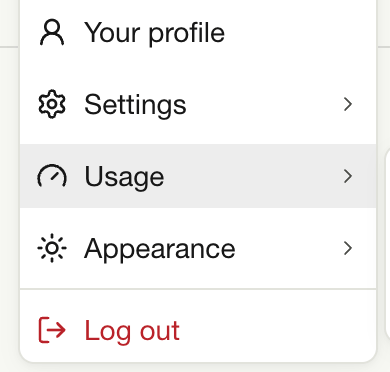
To see the credits you've used, click your name at the bottom of the sidebar in Effective, then
select **Usage**.
 This documentation is built and hosted on [Mintlify](https://mintlify.com), a developer documentation platform.